Docker Kill Command Not Working: Troubleshooting Guide
Let's find out why "Docker Kill Command Not Working" with the common reason behind it and simple steps for troubleshooting with practical commands.
Kashyap Merai / / docker · 4 min read
Docker container management is crucial for the reliability of the application and for container management docker kill is an essential command for stopping the container gracefully. However, there are cases where this simple command encounters unexpected failure leaving users puzzled.
Let’s find out why “Docker Kill Command Not Working” with the common reason behind it and simple steps for troubleshooting with practical commands.
Common Reasons Behind Docker Kill Command Not Working
Usually, when you run the docker stop, it stops the running container but sometimes you need to force it to stop with the KILL signal. It takes 10 seconds by default. If that doesn’t work, let’s find some common reasons why the Docker kill command is not working.
Docker Kill Command Not Working
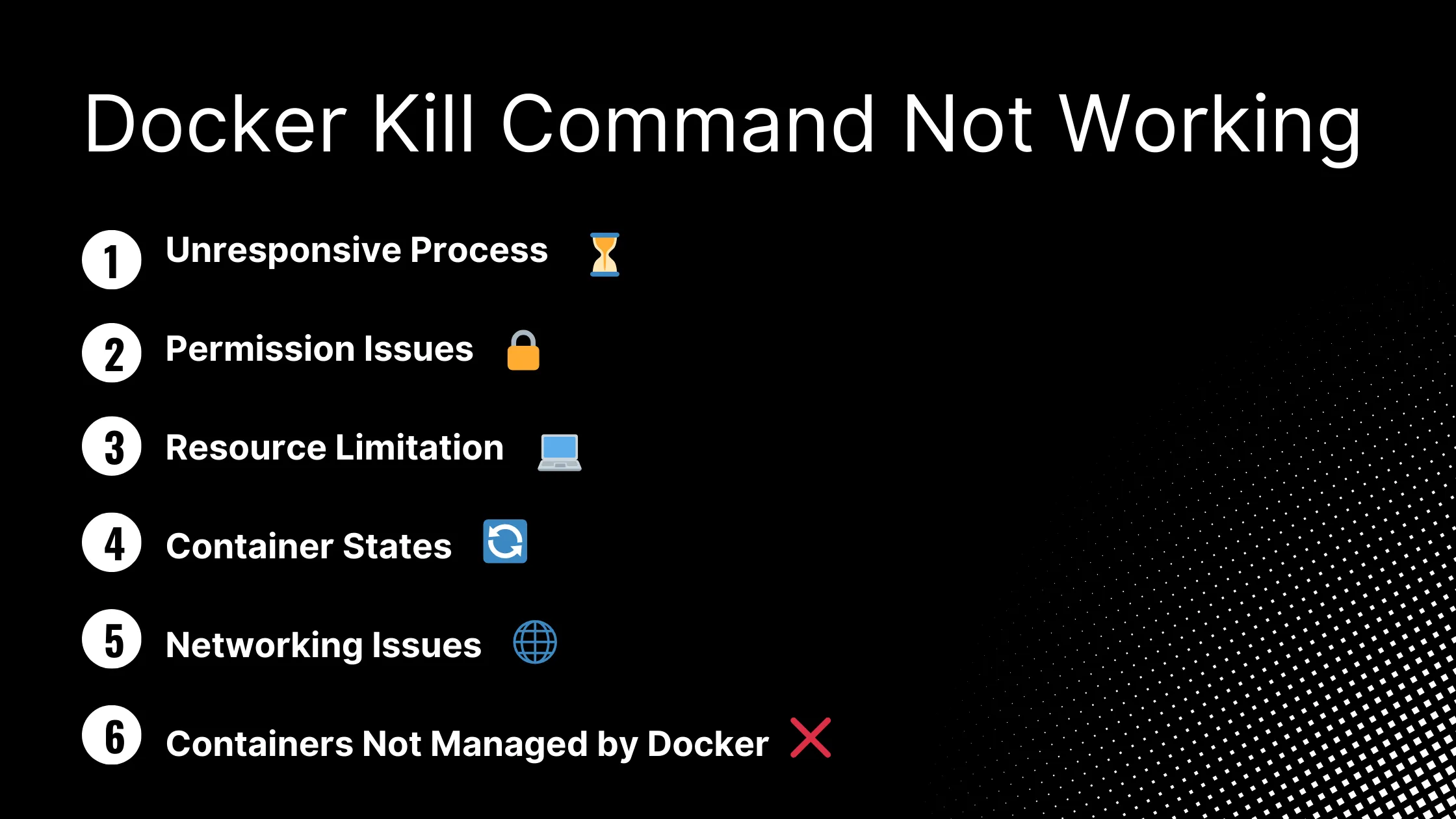
Unresponsive Process
The Docker container keeps alive until the main process is running. The main process inside the container cannot handle the termination signal.
The reason can be a deadlock or some infinite loops. So If the main process running inside is unresponsive or stuck, the Docker kill command will not work.
Permission Issues
Not all users can issue the Docker-related commands. Docker can fail to kill a container if the user running the command doesn’t have the necessary permission to execute it.
Insufficient permission can prevent the user from issuing the Docker stop commands, hence the Docker kill command will not work
Resource Limitation
Limited resources might prevent the container from responding to the Docker kill signal.
When the Docker container faces resource constraints like high CPU, low memory, or maybe no disk space left on the device, this Docker kill command might not work.
Container States
When you run a Docker container, that container can be in various states such as created, running, paused, or stopped. For example, if the container is in a paused state container won’t respond to the Docker kill signal.
This can be another possible reason- the Docker container state, which can prevent the Docker kill command not working.
Networking Issues
Exposing the Docker daemon API to the outside world isn’t the best security practice. But If you have a similar setup then Docker depends on networking for communicating with the containers.
If there are network-related issues like connectivity or some kind of Firewall rules then Docker kill command does not work.
Containers Not Managed by Docker
If the Docker daemon is not responding to the Docker kill command then there’s a chance that the container process is created by another process such as Docker Swarm, Kubernetes, Podman, or Systemd.
There might be other reasons not covered above but understanding this common reason can help troubleshoot for the Docker kill command not working.
Master Docker Security - Without the Guesswork
Get the exact steps top engineers use to secure production containers. 100% free.
Troubleshooting Steps: Docker Kill Command Not Working
1. Check Container Status
You can check the current container status by following the command:
# To get all running container
docker ps

# To get all container in all state
docker ps -a
2. Find the Process ID (PID)
Once you check the container status, let’s find the running process and PID:
docker top <<container id>>You can get the running process inside the container with the PID using the docker top command.
Another way you can also use ps aux for finding the running process PID
ps aux | grep <<container id>> | awk '{print $1 $2}'3. Kill the Process
Once you know the process you can forcefully kill the container using docker kill
docker kill -s kill <<container id>>Once you issue the docker kill command, it will send the SIGKILL signal as default. However, you can also modify the signal by passing an extra flag --signal or -s
Another way to kill the process directly:
sudo kill -9 <<process id>>You can kill the Docker container with the below command:
docker kill $(docker ps -q)

docker container kill $(docker container ls -q)
Docker Security Checklist + Guide
Practical, proven strategies to secure your containers like a pro - in under 20 minutes.
Additional Troubleshooting Resouces
Docker Container Security Cheatsheet
“No Space Left On Device” In Docker
How to Keep Docker Container Running For Debugging
How to Attach and Detach From a Docker Container
Find Docker Which Network is Container Using
FAQs
Why is my Docker kill command not working?
There can be various reasons such as Unresponsive Processes, Permission Issues, Resource Constraints, Container States, Networking issues or Container not being managed by Docker. Please check the additional information based on the reason for troubleshooting.
What should I do if none of the troubleshooting steps work?
We already covered the most common issue with the Docker kill command not working but if all the troubleshooting fails then it might be the case where you need advanced troubleshooting. You can contact Docker forums, communities, and GitHub issues for investigation.
How to prevent “Docker kill command failures not working” in the Future?
To prevent this in the future, you can set up container monitoring, optimize resource allocation, and keep the Docker and Host system software up-to-date. You can check out the best practices for running the docker container.


Kashyap Merai, a Certified Solution Architect and Public Cloud Specialist with over 8 years in IT. He helped startups in Real Estate, Media Streaming, and On-Demand industries launch successful public cloud projects.
Passionate about Space, Science, and Computers. He also mentors aspiring cloud engineers, shaping the industry's future.
Connect with him on LinkedIn to stay updated on cloud innovations.