Docker Network External vs Internal: Simplified 3-Minute!
Docker provides multiple network drivers out-of-the-box but let’s explore the difference and when to use “Docker Network External vs Internal“ Network Diagram
Kashyap Merai / / docker · 5 min read
Docker provides multiple network drivers out-of-the-box but let’s explore the difference and when to use “Docker Network External vs Internal“
Understanding Docker Networks
Docker runs your application as a container in a single unit making it easy to manage.
When you run the Docker application you run multiple containers such as a web server, database server, and application layer, therefore efficient communication is crucial. Choosing the right Docker network is key to communicating between the container and the outside world.
Docker offers two main network options:
1. Default Bridge Network
This default Docker network comes pre-configured when you run the containers and connect them to the host network. A Bridge Network is most commonly used to enable communication with other containers on the same host.
2. User-Defined Network
Apart from the default bridge network, Docker provides the flexibility to create a custom network with assigned names and connect specific containers. This allows for isolated communication and restricted access to external resources.
Docker Network Overlay vs Bridge – Ultimate Difference

Docker Security Checklist + Guide
Practical, proven strategies to secure your containers like a pro - in under 20 minutes.
Docker Network External vs Internal
Let’s explore the two main types of user-defined networks
External Networks
External networks allow containers to connect to the outside world.
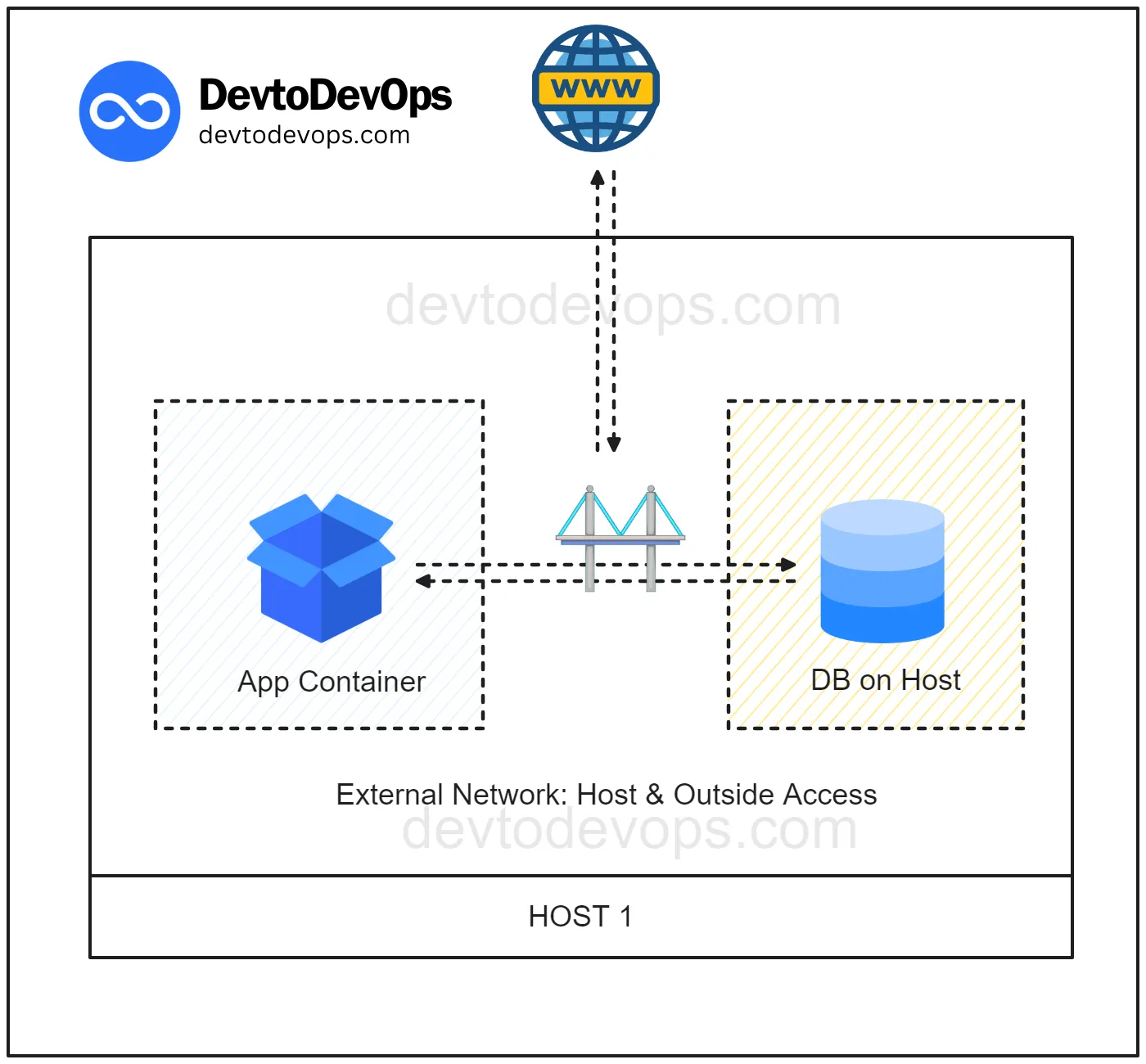
Docker Network External vs Internal - External Network Diagram
When to use External Netowks
Your container needs to access external services like databases, APIs, or other applications running outside of the Docker environment
You want your containers to be accessible from the host machine.
You want your container to be accessible from the internet with proper security.
Communication
Containers in the external network can communicate with each other on the same network as the Docker host. This allows them to access external resources and services from the container.
Let’s say you have MYSQL DB running on a Docker host and a Python application running inside the Docker container, the external network can allow communication in between.
Internal Networks
Internal networks allow containers to connect and communicate securely within.
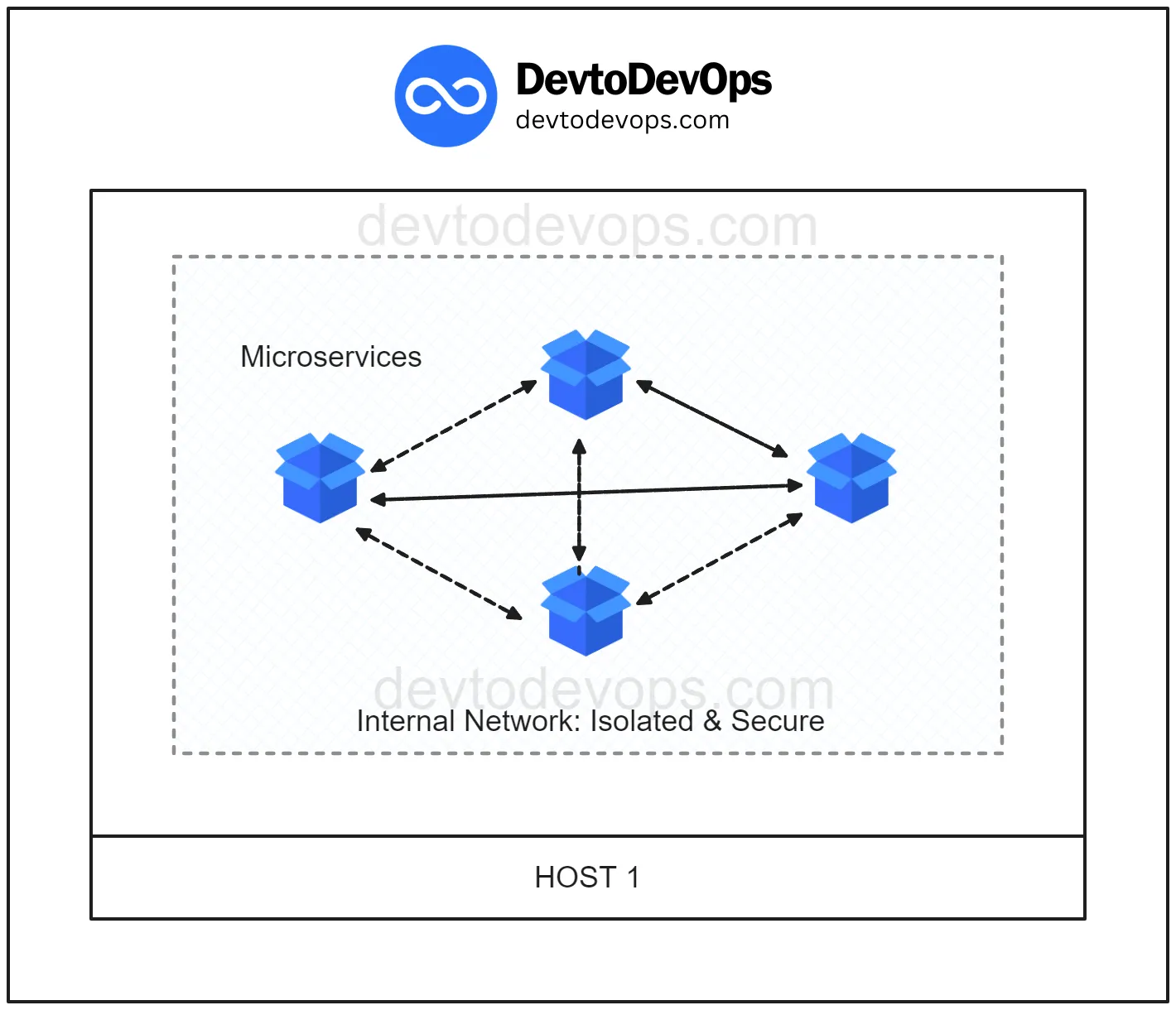
Docker Network External vs Internal: internal Network Diagram
When to use Internal Netowks
You want secure and isolated communication between containers.
Excellent choice for the microservice architecture.
When you want containers to talk with each other but not directly to the outside world.
Isolated Communication
Containers in an internal network can only communicate within the same network, provide network isolation, and enhance security.
Since the service running on the Host or external side can’t communicated this prevents unauthorized access.
Service Discovery
Docker provides the built-in DNS resolution for running containers on the same network. Each container can resolve and discover the other containers with the name.
If you have a multi-tier web application name web and db on the same network, a web container can connect to a Database using db as hostname without remembering the IP address.
Master Docker Security - Without the Guesswork
Get the exact steps top engineers use to secure production containers. 100% free.
Docker Network External vs Internal: Difference
Let’s explore the comparison for Docker Network External vs Internal:
| Features | Internal Network | External Network |
|---|---|---|
| Use Case | Secure and isolated communication within Docker. | Communication with resources outside of Docker. |
| Example Scenarios | Microservices architecture, internal communication. | Accessing external services like databases or APIs. |
| Connectivity | Limited to communication within Docker containers. | Enables communication with resources outside Docker. |
| Security | Provides network isolation, enhancing security. | Requires proper security measures for external access. |
| Service Discovery | Built-in DNS resolution for internal containers. | External services accessed using their endpoints. |
| Accessibility | Containers can only communicate within the network. | Containers can access external services and resources. |
| Use with Host Machine | Containers cannot be directly accessed from the host. | Containers can be accessed from the host machine. |
| Use with Internet | Suitable for internal communication, not for internet access. | Allows containers to be accessible from the internet with security measures. |
| Ideal for | Microservices architectures, internal communication. | Applications requiring external connectivity. |
Docker Network External vs Internal: Difference
Choosing the Right Network for Your Needs
The choice between “Docker network external vs internal” depends on your application architecture and requirements:
Do your containers need external access?
If your container needs to connect with the database, API, or the internet then an external network is the best choice.
My containers act as microservices, only communicating with each other with no external access
An internal network is the perfect choice. Provide secure, isolated communication for your microservices.
My application connects a containerized database that other containers need to interact with
Both the database and the application containers need access, so they should be connected to the same external network.
I want my web application container to be accessible from the internet
An external network is suitable. You can explore the required ports only for the application to work. Check the Docker container security checklist
Conclusion
Understanding the Docker network external vs internal - allows you to create and choose an efficient network for your container application.
You can also check other Docker network drivers such as Docker Network Overlay vs Bridge

Key Takeaways:
- Docker networks enable communication between containers.
- External networks allow containers to access external resources.
- Internal networks provide secure, isolated communication within the same network.
- Use the service discovery to simplify communication.
- Secure your containers by minimizing exposed ports.
Refer to the Official Docker documentation for detailed instructions on creating and managing networks.
Additional Links
Find Docker Which Network is Container Using

Kashyap Merai, a Certified Solution Architect and Public Cloud Specialist with over 8 years in IT. He helped startups in Real Estate, Media Streaming, and On-Demand industries launch successful public cloud projects.
Passionate about Space, Science, and Computers. He also mentors aspiring cloud engineers, shaping the industry's future.
Connect with him on LinkedIn to stay updated on cloud innovations.