Convert Terraform YAML to HCL: 2 Effective Methods
Convert Terraform YAML to HCL using built-in methods and the tfk8s tool. Discover two effective ways with step-by-step examples to simplify your configurations.
Kashyap Merai / / terraform · 5 min read
HashiCorp Configuration Language (HCL) is used for infrastructure management in the Terraform, while the YAML is widely used in Kubernetes and DevOps-related tasks. Converting the YAML to HCL is important for integrating the workflow into the Terraform environment.
In this guide, we will understand two practical methods to convert Terraform YAML to HCL: using built-in Terraform support and using an external tool tfk8s.
Introduction to YAML and HCL in Terraform
YAML and HCL are both widely adopted and human-readable languages.
YAML is commonly used in writing the Kubernetes resources configuration, while HCL is used in the Terraform for writing the declarative infrastructure management.
Converting Terraform YAML to HCL is necessary, especially when moving the Kubernetes-specific tools to Terraform to ensure consistency across the infrastructure management process.
Why Convert YAML to HCL?
Let’s understand why we need to convert the YAML to HCL.
Terraform Compatibility: HCL is the Terraform native language, making it easier to utilize Terraform’s full capabilities.
Infrastructure Consistency: Using and maintaining the same language across your configuration helps avoid errors and encourages collaboration.
Automation: Converting YAML to HCL provides seamless automation within Terraform, ensuring streamlined infrastructure management.
1. Convert Terraform YAML to HCL Using Built-In
Overview of Built-In Support for YAML to HCL Conversion
Terraform provides built-in functions and tooling that provide the conversion of YAML to HCL.
The key function used is yamldecode, which allows you to parse YAML data and convert it into HCL-compatible objects.
Terraform jsonencode Example: A Comprehensive Guide
Steps to Convert YAML to HCL Using Terraform
1. Prepare the YAML File
Make sure the YAML configuration is structured correctly, especially the syntax and indent for conversion.
Example YAML - yamldecode
apiVersion: v1
kind: ConfigMap
metadata:
  name: yaml-hcl-config
data:
  key: 'value'
2. Use yamldecode in Terraform:
Now you can utilize Terraform’s built-in yamldecode function to read the YAML data and transform it into HCL.
Terraform Code
variable "config_yaml" {
  default = <<EOF
apiVersion: v1
kind: ConfigMap
metadata:
  name: yaml-hcl-config
data:
  key: "value"
EOF
}

locals {
  config_map = yamldecode(var.config_yaml)
}

output "hcl_converted" {
  value = local.config_map
}
3. Run Terraform:
When you run terraform apply, the YAML will be decoded into HCL and output can be used in your Terraform environment.
Key Considerations and Best Practices
Handle Nested Structures: YAML might have nested configurations. Terraform provides the automatic type conversion means you don’t have to worry about type. The yamldecode function handles nested structures effectively, converting them into nested maps in HCL.
Validation: After conversion, validate your HCL output to ensure that it matches your intended infrastructure state.
Terraform Validate vs Plan: Understanding the Key Differences
2. Convert Terraform YAML to HCL Using tfk8s
Introduction to tfk8s for YAML to HCL Conversion
tfk8s is a command-line tool for converting Kubernetes YAML manifests directly into Terraform HCL.
It is especially useful in Kubernetes-heavy environments where you need to transition existing YAML files into HCL for Terraform automation.
https://github.com/jrhouston/tfk8s

How to Convert YAML to HCL with tfk8s
1. Install tfk8s
You can install tfk8s using Go:
go install github.com/jrhouston/tfk8s@latest2. Convert YAML Files to HCL
Once installed, you can use the command to convert a Kubernetes YAML file into Terraform HCL:
tfk8s -f deployment.yaml > deployment.tfLet’s understand from an example YAML code
Example YAML - tfk8s
apiVersion: apps/v1
kind: Deployment
metadata:
  name: nginx-deployment
spec:
  replicas: 3
  selector:
    matchLabels:
      app: nginx
  template:
    metadata:
      labels:
        app: nginx
    spec:
      containers:
        - name: nginx
          image: nginx:latest
          ports:
            - containerPort: 80
Once you run the tfk8s command you can have a similar output
Converted HCL Output
resource "kubernetes_deployment" "nginx_deployment" {
  metadata {
    name = "nginx-deployment"
  }
  spec {
    replicas = 3
    selector {
      match_labels = {
        app = "nginx"
      }
    }
    template {
      metadata {
        labels = {
          app = "nginx"
        }
      }
      spec {
        container {
          name  = "nginx"
          image = "nginx:latest"

          port {
            container_port = 80
          }
        }
      }
    }
  }
}
3. Fine-Tuning and Validation
Once the conversion is finished be sure to review the output for any necessary adjustments.
Remember that tfk8s is an experimental tool and can generate unexpected output. tfk8s is focused on the Kubernetes resources and generates the HCL specific to that so refine based on your setup.

Advantages and Challenges of Using tfk8s
Kubernetes-Focused:tfk8s is ideal for those moving Kubernetes manifests into Terraform while keeping similar configuration logic.
Automation-Friendly: Streamline conversion without manual translation efforts. Automatically converting Kubernetes YAML manifests to Terraform HCL.
Limitations: tfk8s is powerful, it is primarily for Kubernetes use cases. For other YAML conversions, consider other tools or manual HCL Bash script.
Free DevOps Learning Board for Absolute Beginners
11 core modules, curated content, and clear action steps - all in one interactive Notion board.
Comparing Both Methods: Which Approach Suits Your Needs?
Built-In Terraform Support
Best suited for generic YAML to HCL conversions where you require full control over the Terraform setup.
It’s also the better option when handling non-Kubernetes YAML files.
tfk8s for Kubernetes-Specific Workloads
Ideal for a Kubernetes-heavy environment, where YAML manifests are the primary configuration format.
tfk8s simplifies this process and integrates smoothly into existing Kubernetes workflows.
Checkout the below table for the details comparison of the Terraform YAML to HCL
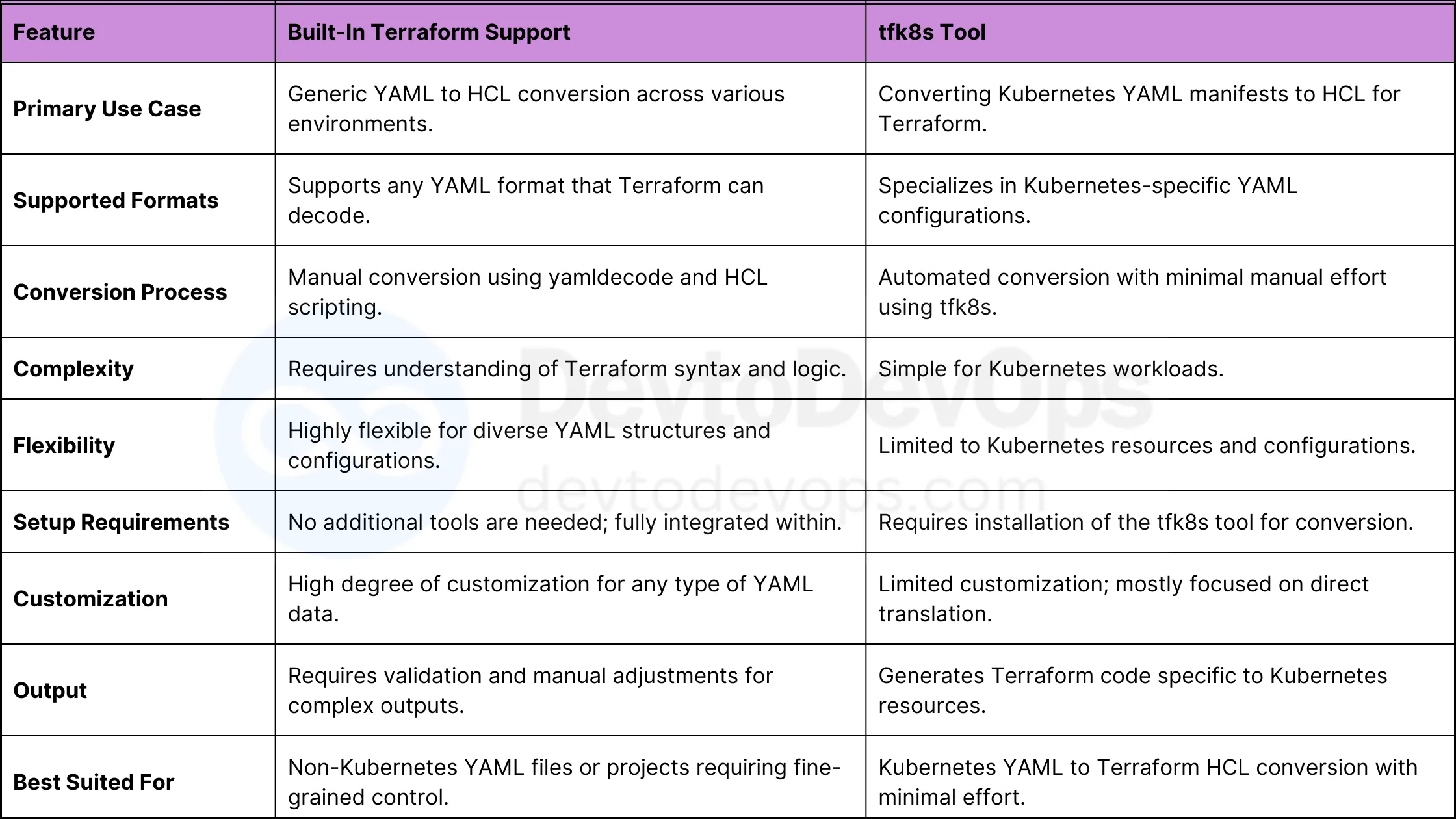
Terraform YAML to HCL Comparison
Conclusion: Efficiently Convert Terraform YAML to HCL
Converting YAML to HCL is a major task when integrating multiple infrastructure management tools.
The built-in yamldecode function in Terraform offers flexibility
tfk8s is a specialized tool for Kubernetes-focused environments.
Depending on your use case, choose the method that fulfills with your needs and start transforming your Terraform configuration.
Kickstart Your DevOps Career
Get the free Notion training board that shows you exactly what to learn, in what order, with zero guesswork.

Kashyap Merai, a Certified Solution Architect and Public Cloud Specialist with over 8 years in IT. He helped startups in Real Estate, Media Streaming, and On-Demand industries launch successful public cloud projects.
Passionate about Space, Science, and Computers. He also mentors aspiring cloud engineers, shaping the industry's future.
Connect with him on LinkedIn to stay updated on cloud innovations.