Podman Build vs Buildah Simplify Container Building Tools
Podman Build vs Buildah depends on your needs. Buliad is an efficient tool to build the image, while Podman is an efficient tool to manage the containers.
Kashyap Merai / / podman · 6 min read
Introduction: Podman Build vs Buildah
The container is a lightweight, self-contained unit to run your application that packs all your dependencies in the container image. A container image is a blueprint with a required library and application code.
Once your container image file is ready, you need tools like Podman and Builadh to build and run these images.
How does Docker run a container?
If you’re familiar with Docker, it runs the centralized daemon process to run and manage containers. Docker daemon does all the jobs such as pull/push images, container management, and running with namespace and group. Docker’s daemon-based architecture is effective but it’s the single point of failure and a major security concern.
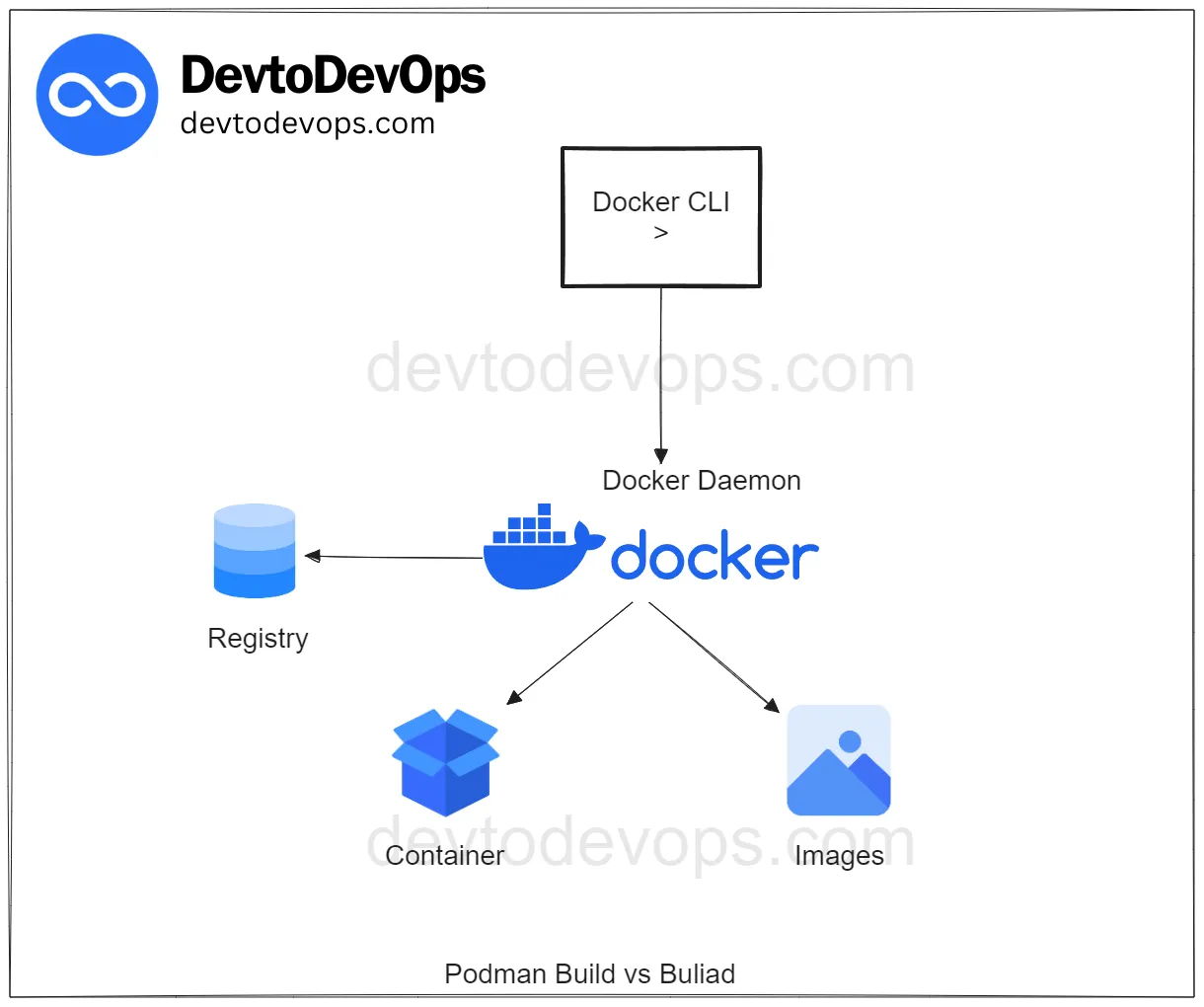
Podman Build vs Buildah Docker Daemon
To eliminate the issue with Docker, Podman comes into the picture for running containers directly with runC without daemon and rootless mode.
Podman runs containers using Open Container Initiative ( OCI ) making it generic and compatible between the runtimes not Docker specific. Podman is a drop-in replacement for the Docker CLI commands. All the commands you’re familiar with in the Docker work the same for the Podman.
I’ve already discussed the difference between Docker and Poman in detail:
Podman vs Docker: Choose the Right One
How to Use Docker Compose with Podman
Now you understand why we moved from Docker to Podman. Let’s check the difference between “Podman Build vs Buildah”
Only Podman CheatSheet You'll Actually Use
Get the essential commands to manage containers faster - zero fluff, 100% useful.
Understanding Podman Build
Podman is a complete package for running and managing the container similar to Docker, providing the runtime and image management.

Podman Build vs Buildah
I assume that you’ve already installed the Podman, if not you can check the installation:
Build Podman from Source: 5 Easy Steps
Podman provides the CLI command podman build that takes the Dockerfile or Containerfile as input and build the container image from it. Yes, you can use Podman to build the Dockerfile without any issues.
podman build -t podman_bulidah:latest .When you run the podman build under the hood, it is called the buildah. “Podman Build vs Buildah” both are open-source projects and work on OCI images and containers but there’s a fundamental difference in the specifications.
Podman build provides the functionality to manage and modify the OCI images:
Pulling the container images
Tagging the container image
Create and run the container image
In summary, it provides the same command as Docker CLI. You can even add the podman as an alias for the docker and it will work identically.
Understanding Buliadh
While the Podman is a full-fledged container management and runtime platform, Buliadh is fundamentally different.

Podman Build vs Buildah
Info: Did you know Buildah come first even before the Podman? That’s why Podman use the Bulidah code rahter than own build management.
Buliadh provides the core functionality for building OCI images- compatible with Podman and other runtime. Bulidah supports all the commands that are found in the Dockerfile.
# Base on the most recently released Fedora
FROM fedora:latest

# Install updates & httpd
RUN echo "Updating fedora packages"; dnf -y update; dnf -y clean all
RUN echo "Installing httpd package"; dnf -y install httpd && dnf -y clean all

# Expose the httpd port 80
EXPOSE 80

# Run the httpd
CMD ["/usr/sbin/httpd", "-DFOREGROUND"]
You can build the image running buildah build
buildah build -t bulidah-fedora-httpd .Buliadh provides the coreutils for building the container images enabling us to write and build the container images platform independently, meaning you don’t need the Dockerfile.
Then you might wonder if not Dockerfile than what?
You can use Buildah to write the Bash scripts for creating the container images.
Stop Googling Podman Commands
Grab the cheat sheet that gives you the right commands, right when you need them.
Key Differences Between Podman Build vs Buildah
| Command | Podman | Buildah |
|---|---|---|
build | Call the Bulidah under the hood. bulidah bud | Emulate the Docker build command build-using-dockerfile (bud) |
commit | Commit on Podman container can only be used with Podman, not Buliadh. The resulting committed image can be used on both | Commit on Buliadh container can only be used with Buliadh, not Podman. The resulting committed image can be used on both |
mount | Only works on Podman container ✅ Buliadh Container❌ | Only works on Buliadh container ✅ Podman Container❌ |
| run | Run in a new container same as docker run command | Runs the container in a similar as RUN command in Dockerfile |
pull/push | Pull/push from the container registry. | Pull/push from the container registry |
rm | Remove Podman container ✅ Buliadh Container❌ | Remove Buliadh container ✅ Podman Container❌ |
containers | Does not exist on Padman❌ | List the Buliadh containers ✅ |
ps | List the Podman containers ✅ | Does not exist in Buliadh❌ |
Difference Between Podman Build vs Buildah
Buildah
Specialize in building the OCI images
Support the
Dockerfilecommands offer low-levelcoreutilsNo daemon for image building
Support other languages for image building such as Bash script
Building images from scratch helps to make lightweight images.
Podman
Specialize in container management
Performs actions such as pulling, tagging, creating, and running containers
No daemon for management
Choosing the Right Tool: Podman Build vs Buildah
Choosing the right tool: “Podman build vs Buliadh” depends on your requirements and comfort level with the containers and management.
Recommendation for Podman
If you’re comfortable with the Docker and want a similar and straightforward way to build and manage your containers- Podman is the right choice.
Advantages - Podman
Easy to transition from Docker
Identical commands and compatibility with the Docker CLI
Use Cases - Podman
Team members are already comfortable and efficient with Docker and looking for a secure alternative.
Quick and easy container image building without extra customization.
Recommendation for Buildah
If you’re an advanced user seeking more control and customization over the entire build process, Buildah is the right choice.
Advantages - Buildah
Extensive control over image layers builds from scratch with empty dir
Support for scripting language without depending on
DockerfileSuitable for complex image-building pipeline
Use Cases - Buildah
The project needs high customization and optimization
Needs image building from scratch and fine-tuning for layers
Team members are comfortable with the low-level tools.
Consider your and your team’s familiarity with Docker and specific container image budding needs and decide based on the above point for choosing Podman to build vs Buildah.

Conclusion
In conclusion, choosing the right tool: Podman Build vs Buildah depends on your requirements and expertise.
Choose Podman if you want a similar experience as Docker and a full container management tool. Choose Buildah if you want a complex image-building process and customization.
Buildah is an efficient way to build the container image, while Podman is an efficient tool to manage the containers.

Kashyap Merai, a Certified Solution Architect and Public Cloud Specialist with over 8 years in IT. He helped startups in Real Estate, Media Streaming, and On-Demand industries launch successful public cloud projects.
Passionate about Space, Science, and Computers. He also mentors aspiring cloud engineers, shaping the industry's future.
Connect with him on LinkedIn to stay updated on cloud innovations.